
Visual Topology Canvas
Build network diagrams and connect devices with a clean drag-and-drop workspace.
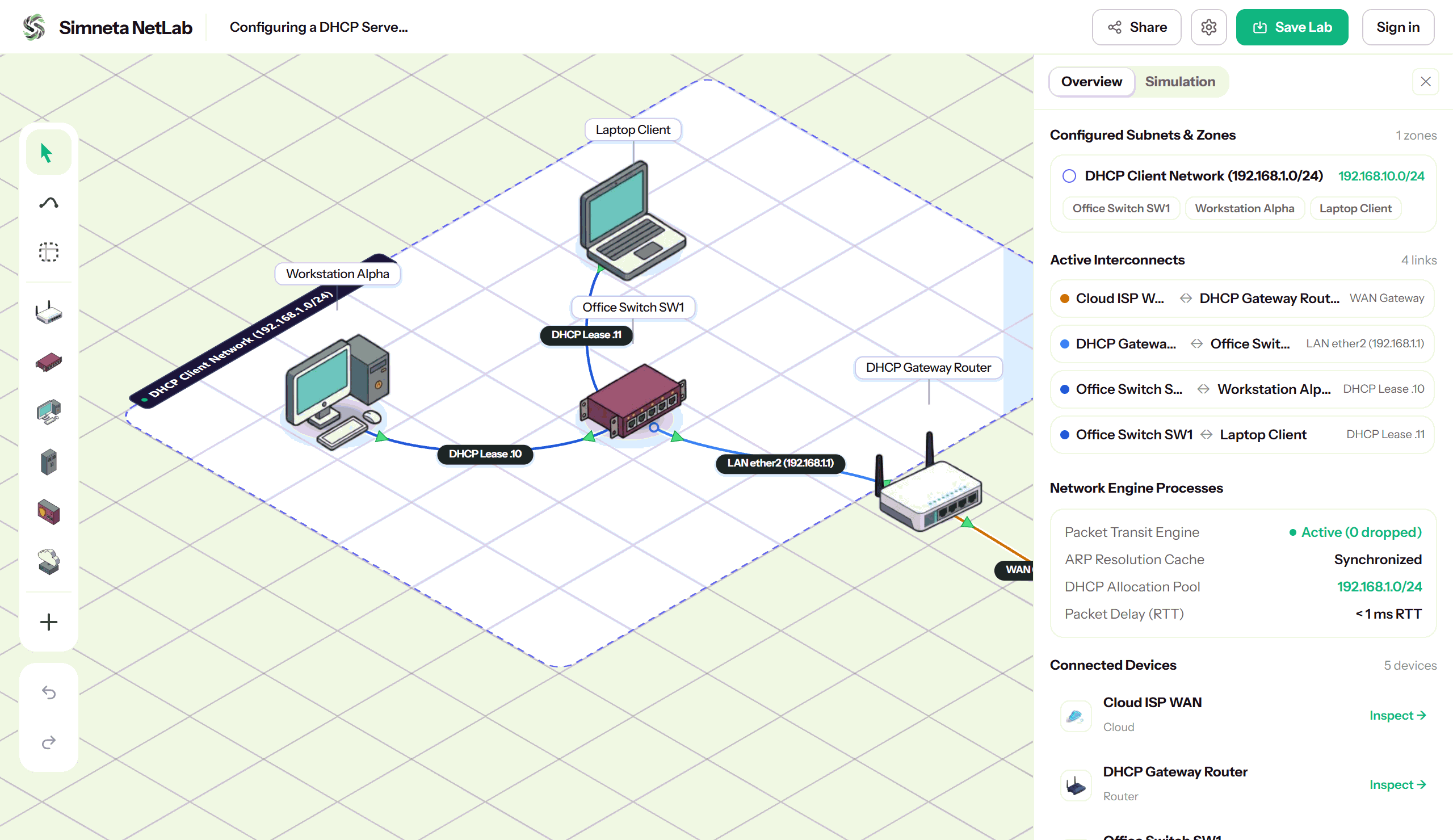
Overview
In traditional networking education, building a clean network topology required heavy desktop software, complex virtual machine apps, or static diagramming tools that could not actually route packets. Simneta NetLab replaces that fragmented workflow with a unified, high-performance web canvas that bridges schematic visualization and live packet simulation.
Every device dropped onto the canvas—whether an enterprise core switch, a MikroTik router, or a departmental workstation—is a fully reactive network node with real hardware interfaces, MAC tables, and IP configuration state. As you draw links between ports, the engine computes physical Layer 1 media negotiations, lights up real-time link state indicators, and provisions virtual Ethernet interfaces on the fly.
The canvas features an isometric diamond grid that automatically aligns hardware components into clear, legible rack or office arrangements. You can organize complex multi-tier topologies using color-coded subnet zones, inspect connection matrixes at a glance, and export high-resolution topology blueprints for reports and documentation.
Key Feature Capabilities
A clear breakdown of how this feature works and helps you learn networking.
Instant Device & Link Updates
Device positions, cable links, and connection status update immediately as you draw and configure them, with smooth responsive motion and zero lag.
Automatic Cable & Port Detection
Ethernet cables automatically connect compatible ports, while live status lights show green when links are active and gray when disconnected.
Clean Grid & Snapping Canvas
Smooth pan and zoom controls make it easy to view large topologies. Devices snap neatly to the isometric grid to keep diagrams organized and legible.
Lightweight File Export
Save and share your complete lab topologies as lightweight JSON blueprints. Files save your device settings, IP assignments, and layout coordinates for easy sharing.
What You Can Do
Drag and drop routers, switches, PCs, and servers onto an aligned grid
One-click cabling with automatic port selection and link indicators
Color-coded subnet zones to visually group departments and IP ranges
Instant switch between clean 2D schematic and 3D isometric perspectives
Undo and redo history support with fast zoom and pan controls
Feature Specifications
A quick breakdown of how this capability works and why it helps your network practice.
| Aspect | How It Works in Simneta | Why It Matters |
|---|---|---|
| Supported Devices | Routers, Layer 2 Switches, PCs, Laptops, Servers, Firewalls | Build realistic multi-device business topologies |
| Cabling Modes | Cat6 Ethernet, Fiber Optic, WAN Links, Console Cables | Practice choosing correct media types |
| Subnet Grouping | Visual rectangular zones with custom colors and CIDR labels | Clearly separate departments like Finance and Guest Wi-Fi |
| Export & Share | Save as JSON project file or high-resolution PNG image | Turn in school assignments or share diagrams with teammates |