
Simulation Mode & Packet Flow
Watch data packets travel across cables and inspect network protocols in real time.
Overview
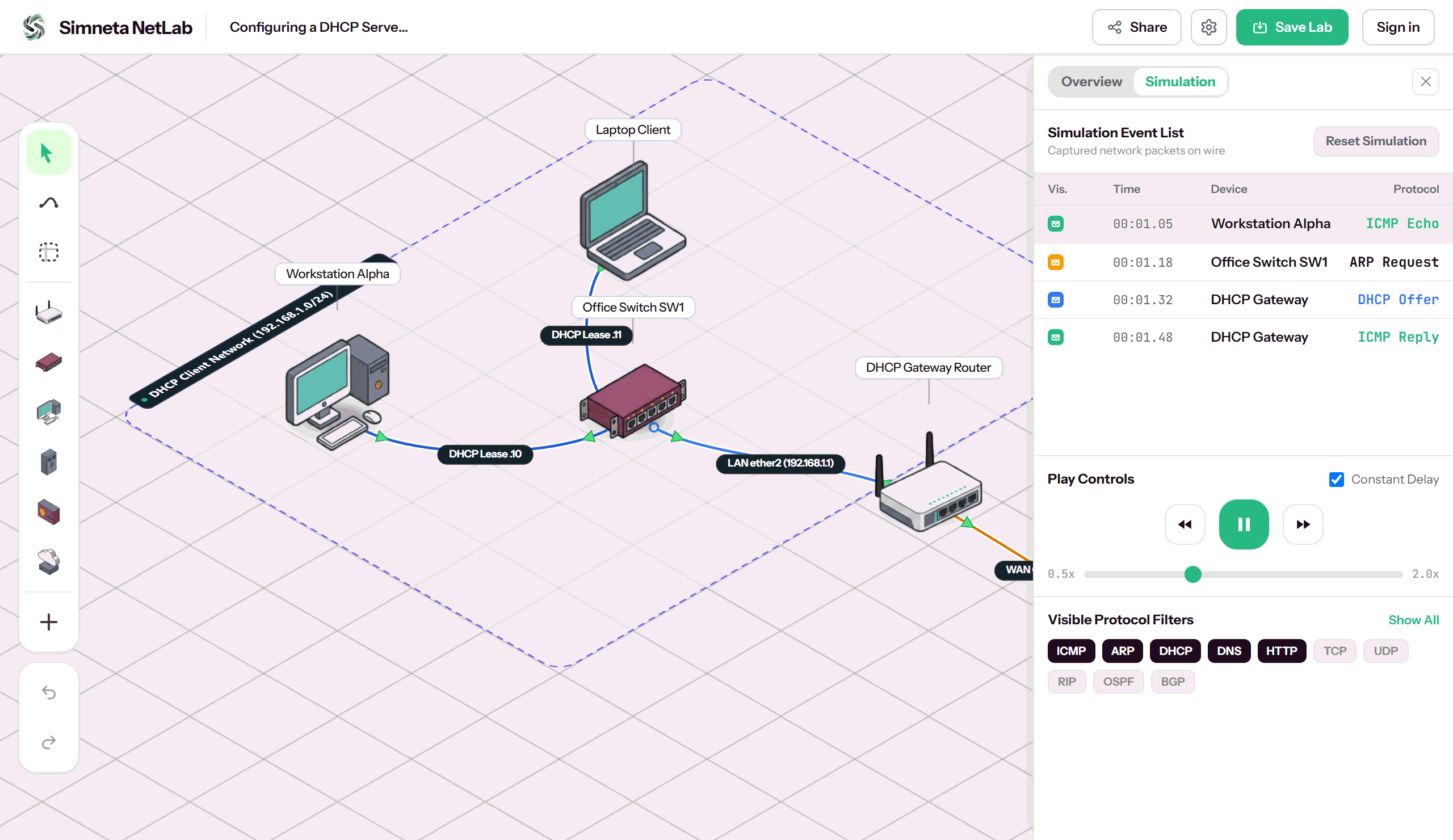
In physical hardware labs or standard command-line tools, network traffic is essentially invisible: you type a ping command, wait a few milliseconds, and receive text replies. When packets fail, learners are left guessing whether the breakdown occurred during ARP address resolution, default gateway lookup, VLAN tagging, or firewall dropping.
Simneta NetLab makes packet mechanics completely transparent with its real-time Simulation Event Mode. By switching from realtime forwarding to discrete event simulation, you can freeze time, advance packet transmissions one hop at a time, and watch color-coded frame pulses travel across cables between devices.
Every in-flight packet can be clicked to inspect its encapsulated protocol layers—from Layer 2 Ethernet source and destination MAC addresses to Layer 3 IPv4 headers, TTL counters, and Layer 4 TCP/UDP port flags. It delivers step-by-step visual packet clarity without requiring confusing external packet capture software.
Key Feature Capabilities
A clear breakdown of how this feature works and helps you learn networking.
Step-by-Step Simulation Mode
Simulates network protocol traffic one step at a time. Packets check routing tables, ARP records, and switch tables as they travel from hop to hop.
Clear Protocol Header Inspector
Click any packet to inspect its Layer 2 MAC addresses, Layer 3 IP source and destination addresses, TTL counters, and protocol data in a clean, readable panel.
Quick Protocol Filters
Filter visible traffic with a single click. Show or hide ICMP ping requests, ARP broadcasts, DHCP discovery messages, and DNS queries easily.
Step-by-Step Playback Controls
Pause the simulation to analyze packet flow at your own pace. Watch an ARP request broadcast to all switch ports, see the reply returned, and watch ping packets proceed.
What You Can Do
Animated packet pulses moving along active cables in real time
Playback controls: Play, Pause, Step Forward, and Reset simulation time
Protocol filter toggles: show or hide ICMP, ARP, DHCP, DNS, TCP, and OSPF
Click any event in the table to inspect Layer 2 and Layer 3 packet headers
Instant visual alerts when packets drop due to missing routes or bad cables
Feature Specifications
A quick breakdown of how this capability works and why it helps your network practice.
| Aspect | How It Works in Simneta | Why It Matters |
|---|---|---|
| Supported Protocols | ICMP (Ping), ARP, DHCP, DNS, TCP, UDP, OSPF | Understand essential OSI model layers in action |
| Inspection Level | Ethernet Frame (MAC), IPv4 Header (IP), and Protocol Payload | Inspect packet headers clearly without overwhelming complexity |
| Time Control | Real-time speed, slow motion, or manual single-step advance | Explain step-by-step ARP resolution clearly to students |
| Event History | Chronological event list with device origin and status badges | Trace exact failure points in broken network topologies |