
Subnets & VLAN Segmentation
Separate networks into secure broadcast domains with 802.1Q tags and subnet masks.
Overview
In any multi-department organization, running a flat Layer 2 network is a recipe for disaster: broadcast storms consume bandwidth, and unsegmented endpoints expose confidential internal servers to guest devices. In production enterprise networks, segmentation is achieved using Virtual Local Area Networks (VLANs) governed by IEEE 802.1Q.
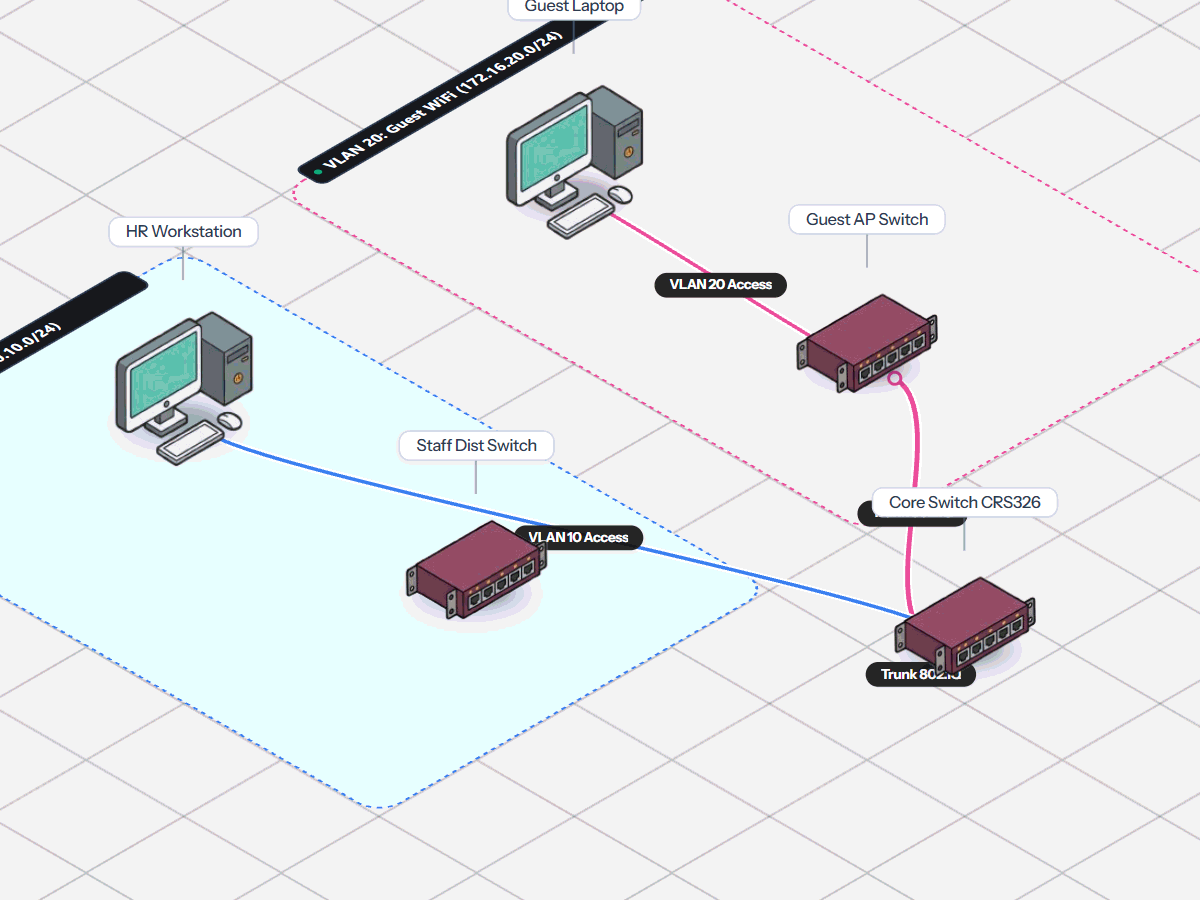
Simneta NetLab delivers full Layer 2 and Layer 3 segmentation simulation. You can slice physical switches into isolated broadcast domains, designating individual physical interfaces as untagged Access ports for client PCs or tagged 802.1Q Trunk ports carrying multi-VLAN traffic across inter-switch backbone links.
To route traffic between isolated VLAN domains, you can configure router sub-interfaces in a classic Router-on-a-Stick topology or deploy Layer 3 switch virtual interfaces (SVIs). Combined with visual colored subnet boundary zones on the canvas, engineers gain an intuitive grasp of logical versus physical network boundaries.
Key Feature Capabilities
A clear breakdown of how this feature works and helps you learn networking.
Authentic 802.1Q VLAN Tagging
Untagged traffic entering access ports is tagged with a VLAN ID, while trunk ports carry traffic for multiple VLANs between switches and remove tags for destination PCs.
Isolated Department Networks
Switches keep network traffic separated so that broadcast traffic sent in VLAN 10 never leaks into VLAN 20, keeping internal communications private and secure.
Inter-VLAN Router-on-a-Stick
Routers support sub-interfaces (like ether1.10 and ether1.20) to route traffic between isolated VLANs through a single connected cable.
Color-Coded Subnet Zones
Draw clear rectangular subnet boundary boxes on your canvas with custom colors and network labels to keep network maps readable and organized.
What You Can Do
Create 802.1Q VLANs with custom IDs (e.g. VLAN 10 Staff, VLAN 20 Guests)
Assign switch ports to Access mode or multi-VLAN Trunk uplinks
Draw visual subnet boundary zones with custom colors and CIDR prefix labels
Configure router sub-interfaces for inter-VLAN routing
Prevent broadcast traffic leaks between separate department networks
Feature Specifications
A quick breakdown of how this capability works and why it helps your network practice.
| Aspect | How It Works in Simneta | Why It Matters |
|---|---|---|
| VLAN Standard | IEEE 802.1Q VLAN tagging | Industry-standard trunking matching physical switches |
| Port Modes | Access Ports (single VLAN) and Trunk Ports (all VLANs tagged) | Connect PCs cleanly and run high-bandwidth trunk uplinks |
| Routing Method | Router-on-a-Stick sub-interfaces (e.g. ether1.10, ether1.20) | Route between VLANs using a single router cable |
| Visual Feedback | Color-coded boundary boxes on the topology canvas | Instantly see which computers belong to which network zone |